.png)
Framed Scenes Happy Birthday
- Charlene Tackvic
- Jun 10, 2025
- 2 min read

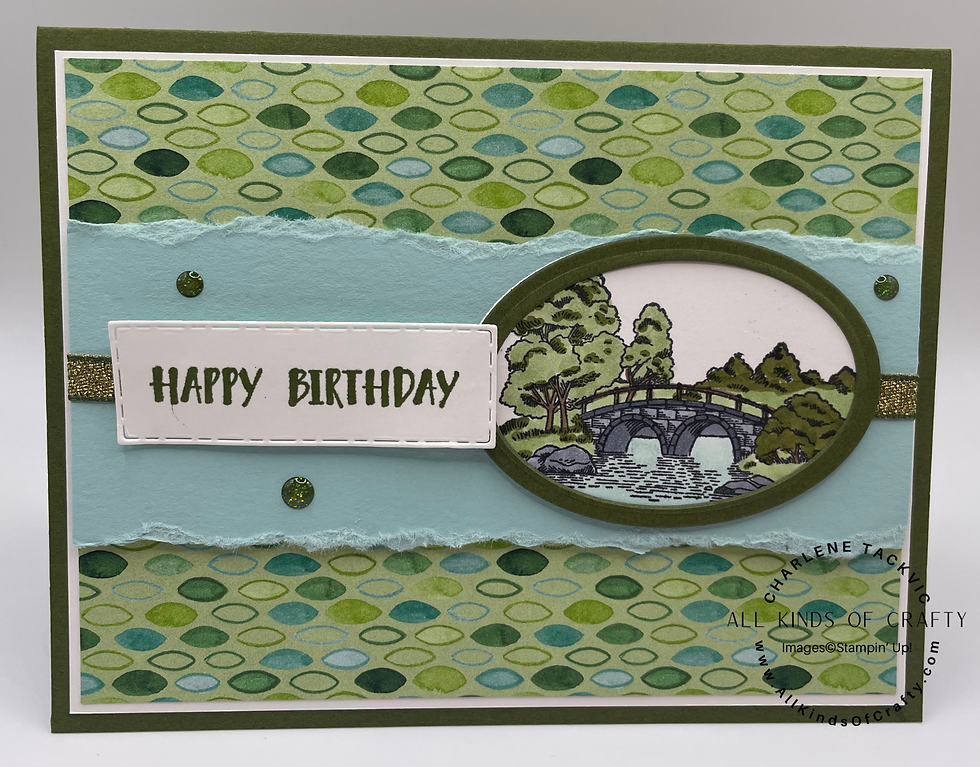
Tonight, I participated in a Mystery Stamp with several demonstrators. The host shared the dimensions of the paper and that we should include DSP, and an image about 3 inches long, and that we should include ribbon, embellishments and a sentiment. We were told that it would be better is the DSP was a pattern and that it would be best if it was a landscape design.
We were given step-by-step instructions and some time to get each stept completed.
When the time was up, we were asked questions about our card. If the answer was yes, we were still in the running for a prize. Guess what?? I won the first prize!
My card is very simple. You should have seen some of them, they were gorgeous!
Below is the information that we were given and the product list for my card. The ribbon and the sparkle dots won't be available until July 1st. I will update the supplies once they are available to order.
Cardstock Measurements
Solid Cardstock Color (A): I used Mossy Meadow.
5-1/2 x 8-1/2"
Solid Cardstock Color (B): I used Pool Party.
2-1/2 x 5-1/8"
Both sides along the 5-1/8" were torn in the same direction.
Basic White:
4 x 5-1/4"
Patterned Paper (if directional, landscape) (pattern vs. imagery would be better):
3-7/8 x 5-1/8" I used Florals in Bloom DSP.
Other cardstock:
You'll need cardstock for a sentiment (longer vs. chunky is better) and a coordinating image that can be die cut (ideally no bigger than 3 x 3").
You'll also need:
Stamped image that can be die cut or fussy cut out. I used the Framed Scenes bundle. I used the larger oval die to cut out the stamped image and then used both ovals with Mossy Meadow cardstock to create a border for the stamped image.
Sentiment I used Happy Birthday from the
Ink as needed. I used Copics because I don't have all of the Stampin' Blends. I listed the Stampin' Up! Stampin' Blends that should be used.
Embellishments and ribbon - Low-Profile Sparkle Dots and Mossy Meadow & Gold 1/4" ribbon will be availble in July.

Comments